|
|
IN A NUTSHELL: Taking a good photo of a coin is tricky business. Sometimes
you get it right the first time. Other times you need to try different options. |
|
|
|
|
|
|
|
|
|
|
|
|
|
|
|
|
|
|
|
|
|
|
|
|
|
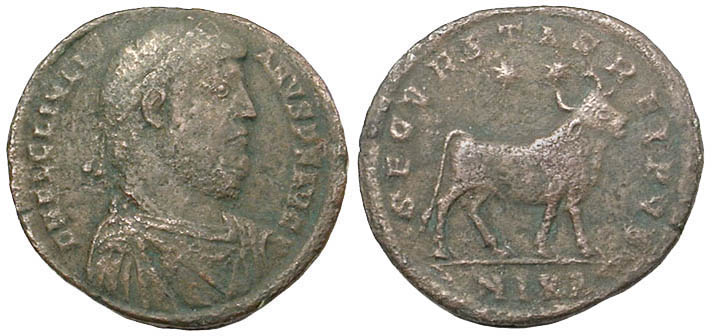
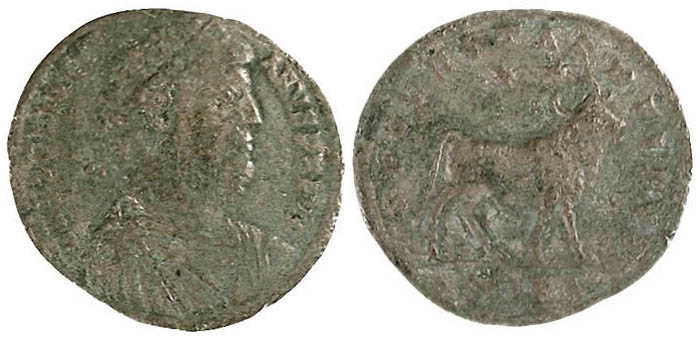
Two photos of the same Julian II AE-29, an ancient Roman
bronze coin struck c. 360-363 AD, the top imaged well, the bottom not |
|
|
|
|
|
|
|
|
|
|
|
|
|
|
|
|
|
|
|
|
|
|
|
|
|
Coin photography is a fun and interesting area. Quality
coin images depend far more on technique than equipment.
More serious collectors opt for a digital camera rather than a scanner. The former gives you greater control and
leads to better images but takes more time.
Any digital camera with at least 3 megapixels of resolution and a macro mode will let you take quality photos of
most coins for the Web. More pixels let you take quality photos of very small coins, home in on very small areas
of any coin, or take better quality photos for print.
How you configure the lighting is the most important factor in producing a quality coin photo. I took both photos,
but with the second, which has been at one of my Web sites for a while, I didn't take as much care with adjusting
to the optimal distance and angles the two goose-neck desk lamps I had been using at the time, and the coin looks
about a grade poorer than it is in actuality. |
|
|
|
|
|
|
|
|
|
|
|
|
|
|
|
|
|
|
|
|
|
|
|
|
|
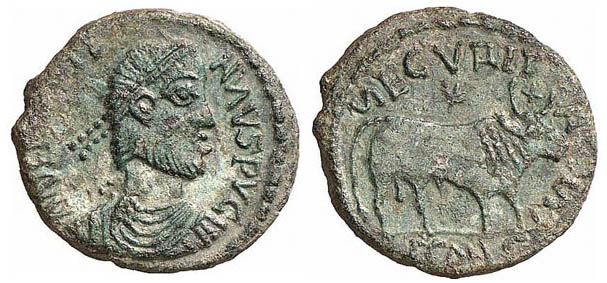
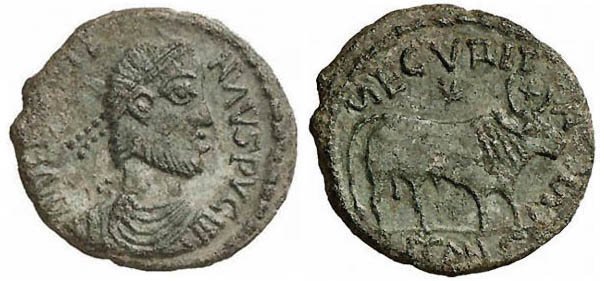
Two photos of the same Julian II AE-24 imitative, a
coin mintred in ancient times by a tribal people in imitation of a Roman bronze coin struck c. 360-363 AD, the
top imaged poorly, the bottom well |
|
|
|
|
|
|
|
|
|
|
|
|
|
|
|
|
|
|
|
|
|
|
|
|
|
No matter how good a photographer you are, doing post processing
with an image editor such as Adobe Photoshop, Adobe Photoshop Elements, or Corel Paint Shop Pro is often need if
you want to make the image on screen look as close as possible to the coin in hand.
Some sellers photoshop coins to make them appear better in the photo than they are in hand. Methods used include
eliminating scratches and roughness, bumping up the contrast beyond reality, and making the saturation really pop
out. Ironically, some people, in trying to make a coin photo look at good as it can, actually make it look worse.
The above coin is such an example.
The photos above show the negative unexpected results that can happen when you overprocess a coin photo in an image
editing program. The top photo was used by a prestigious auction firm to sell the coin. It appears that the photographer
lightened the image, increased the contrast, boosted the saturation, and sharpened it ... beyond reality. But instead
of improving the coin's appearance, the postprocessing made the coin's surfaces appear unattractively mottled and
porous. Using Photoshop, I edited the image, resulting in the bottom photo, which much more closely approximates
what the coin looks like in hand. |
|
|
|
|
|
|
|
|
|
|
|
|
|
|
|
|
|
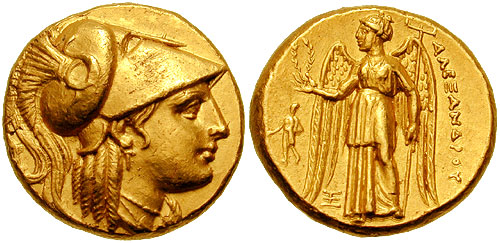
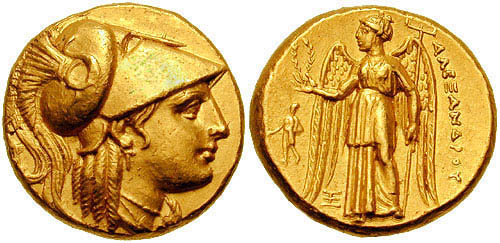
Two photos of the same Alexander the Great lifetime
gold stater, a coin minted in Abydos, Troas, Asia Minor, c. 328-323 BC, the top a mediocre image, the bottom a
better one |
|
|
|
|
|
|
|
|
|
|
|
|
|
|
|
|
Even the work of very good photographers can sometimes be
improved. The top photo was taken by a professional at one of the world's top auction houses. It's a good photo
but far from perfect.
The most glaring problem was caused by, well, glare. Athena on the obverse has a very faint scuff mark on the obverse
on Athena's helmet. It's visible only when tilting the coin in hand so that the mark hits the light at a certain
angle. The coin was unwittingly photographed with the light hitting the helmet at just that angle, which makes
the scuff mark a lot more pronounced than it is in hand. In the bottom photo, I used Photoshop to make the helmet
look as close to possible to how it looks with the coin in hand. This illustrates how Photoshop and other image
editing programs can not only be used deceptively in coin photography to hide scratches, flatness, and wear and
to impart artificial color, luster, and relief, but also to lessen the appearance of minor defects to make the
coin look at closely as possible to how it looks in hand.
The reverse of this coin also appears worse in the photo, with a slight crease on Nike's cheek appearing as a dark
line. In hand this crease is visible also only when the light hits the coin at a certain angle.
This touches upon only the very basic of basics. There are a number of Web sites out there that go into the required
detail, and a simple Google search for "coin photography" will return some good ones. Ultimately, though,
you have to experiment with what works best for you. |
|
|
|